


SAP systems are the backbone of most organizations, supporting critical business functions such as Finance, Human Resources, Procurement, Manufacturing, and Supply Chain operations. Because of their central role, they also become attractive targets for unauthorized access, fraud, and operational misuse.
Often, security risks do not arise from sophisticated cyberattacks but from excessive or poorly controlled access. A user may be able to schedule background jobs under another user’s ID, a developer may retain access to production after a project is completed, or a temporary administrative authorization may remain assigned long after its intended purpose has ended. These seemingly minor oversights can create significant security, compliance, and audit concerns.
Regular SAP security audits play a crucial role in identifying such risks before they lead to data breaches, unauthorized system changes, segregation-of-duties conflicts, or business disruptions.
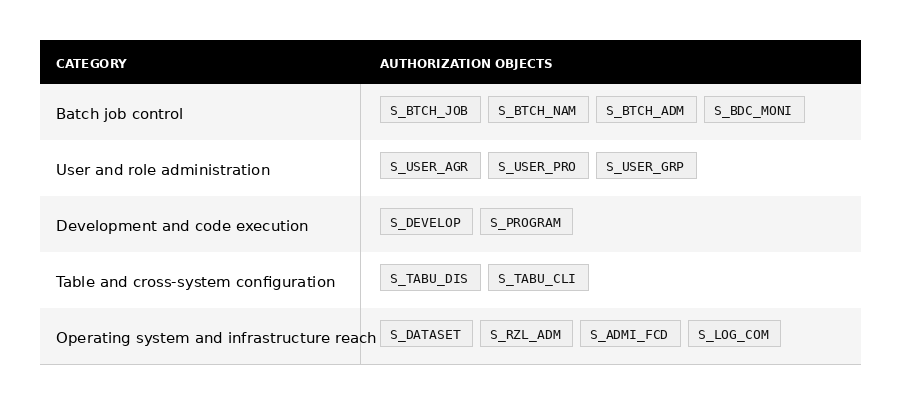
This article highlights sixteen critical SAP authorization objects that are frequently reviewed during security and compliance audits. Organized by risk category, it explains the purpose of each authorization object, the associated risks, key audit considerations, and recommended controls to help organizations strengthen their SAP security posture and maintain compliance with internal and regulatory requirements.
Batch Job Control (S_BTCH_JOB, S_BTCH_NAM, S_BTCH_ADM, S_BDC_MONI)
Background processing is often the least scrutinized layer of an SAP landscape — jobs run silently, at odd hours, under technical users nobody questions. That’s precisely why it’s attractive to abuse.
S_BTCH_JOB governs the job lifecycle itself: create, release, cancel, delete. A user with broad release rights can push a sensitive report to execute without the normal approval chain.
S_BTCH_NAM is more insidious — it lets a job run as someone else. Combined with a privileged technical account, this becomes a way to inherit authorizations the requesting user doesn’t actually have. Auditors should specifically cross-reference job logs against the user IDs the jobs executed under.
S_BTCH_ADM is essentially “root” for batch processing — full visibility and control over every job in the system, regardless of owner. Treat any non-Basis assignment as a finding requiring justification.
S_BDC_MONI controls SM35 batch input session monitoring. While less powerful than the others, it allows reprocessing of failed mass-upload transactions — a vector for re-injecting data that was previously rejected for valid reasons.
Audit tip: Pull a sample of jobs scheduled under SAP, DDIC, or other system accounts and verify each was triggered by an authorized process, not a regular user exploiting S_BTCH_NAM.
User and Role Administration (S_USER_AGR, S_USER_GRP, S_USER_PRO)
This cluster is the classic “who watches the watchmen” problem. Anyone holding broad rights across all four objects can effectively create a user, build a role with whatever permissions they like, assign it to themselves, and clean up the trail.
S_USER_AGR (role admin) and S_USER_PRO (profile admin) are particularly dangerous in combination profiles bypass the more transparent role-based assignment process and can grant access directly, often without the same approval workflow.
S_USER_GRP restricts user maintenance to specific user groups, which is a useful control when configured correctly, but a gap when group assignments are too broad (e.g., an admin team that can maintain “all users” rather than only their designated business unit).
Audit tip: The real test isn’t whether one person has all four it’s whether the combination across a team violates segregation of duties. The person who approves access requests should not also be the person who can technically grant them unchecked.
Development and Code Execution (S_DEVELOP, S_PROGRAM)
S_DEVELOP is effectively a master key to the ABAP Workbench SE38, SE80, debugging with change capability, and more. In a development system, this is normal. In production, it’s a five-alarm finding: it means someone can write and run arbitrary code against live business data, often with the ability to debug-and-replace variables in running processes (a known privilege-escalation technique via debugger).
S_PROGRAM is more nuanced because its risk depends entirely on which programs are in scope. A user authorized to execute a narrow set of reports via SUBMIT is low-risk; a user authorized for program group (*) can run anything, including undocumented or custom programs that bypass standard transaction controls entirely.
Audit tip: For S_DEVELOP in production, ask not just “who has it” but “has it ever been used” system logs (SM20/STAD) can show whether dormant access has actually been exercised, which often surfaces unauthorized changes that were never logged through transport management.
Table and Cross-System Configuration (S_TABU_DIS, S_TABU_CLI)
S_TABU_DIS controls table maintenance grouped by authorization group — essentially a permission layer over SM30/SM31. The critical detail auditors miss is the activity value: ACTVT 03 (display) is informational risk, but ACTVT 02 (change) on the wrong table group, say, payroll configuration or pricing tables , is a direct path to financial manipulation.
S_TABU_CLI is the nuclear option: cross-client maintenance means a change in one client ripples across every client on that system, including production. This authorization should be vanishingly rare outside Basis, and any assignment to a functional or business user is almost always a misconfiguration rather than a deliberate decision.
Audit tip: Don’t just check who has S_TABU_DIS, map the authorization groups assigned against the actual tables in those groups, and flag any group containing both “harmless” config tables and sensitive ones (a common design flaw that grants more than intended).
Operating System and Infrastructure Reach (S_DATASET, S_RZL_ADM, S_ADMI_FCD, S_LOG_COM)
This is where SAP authorizations stop being “application risk” and start being “infrastructure risk.”
S_DATASET governs file-level access at the OS layer through SAP read, write, delete. Interfaces legitimately need this to exchange files, but unscoped path authorizations (wildcards on directory paths) mean a user could potentially read configuration files, log files, or other sensitive data well outside SAP’s normal data model.
S_RZL_ADM covers CCMS the technical nervous system for monitoring and managing application servers. Misuse here is less about data theft and more about availability: someone with this access could disrupt workload distribution or take servers offline.
S_ADMI_FCD is a grab-bag of administrative switches, several of which deserve individual attention: client copy authorizations (which can overwrite entire clients), spool administration (access to potentially sensitive print/output data across the system), and system monitoring functions that can reveal configuration details useful for further attacks.
S_LOG_COM is arguably the most dangerous object on this entire list, it allows SAP to trigger operating-system-level commands defined in SM69. If those command definitions aren’t tightly controlled, this becomes a direct path from the SAP application layer to the underlying OS shell.
Audit tip: For S_LOG_COM, don’t stop at “who has the authorization” review the SM69 command table itself. A command defined with a wildcard parameter or shell metacharacter handling issues can turn a “harmless” authorization into arbitrary command execution.
Closing Thoughts
These authorization objects are essential for running and managing an SAP system, but with great access comes greater responsibility. The goal of an SAP audit is not to remove critical permissions, but to ensure they are assigned only where there is a valid business need and are reviewed regularly. When access is not properly governed, excessive privileges can accumulate over time, increasing the risk of security incidents, compliance violations, and audit findings. Regular reviews and adherence to the principle of least privilege are key to maintaining a secure and compliant SAP environment.
Disclaimer
This article is provided for educational and informational purposes only. Organizations should assess their own business, security, and compliance requirements before making any authorization or access control decisions.